
Everything your camp needs, in detail
Twelve things Hutvista does for a camp, what each one fixes, and how it works day to day. All of it is included in the one price.
01
Lead capture
Every enquiry from your website lands in Hutvista, ready to work.
What it does
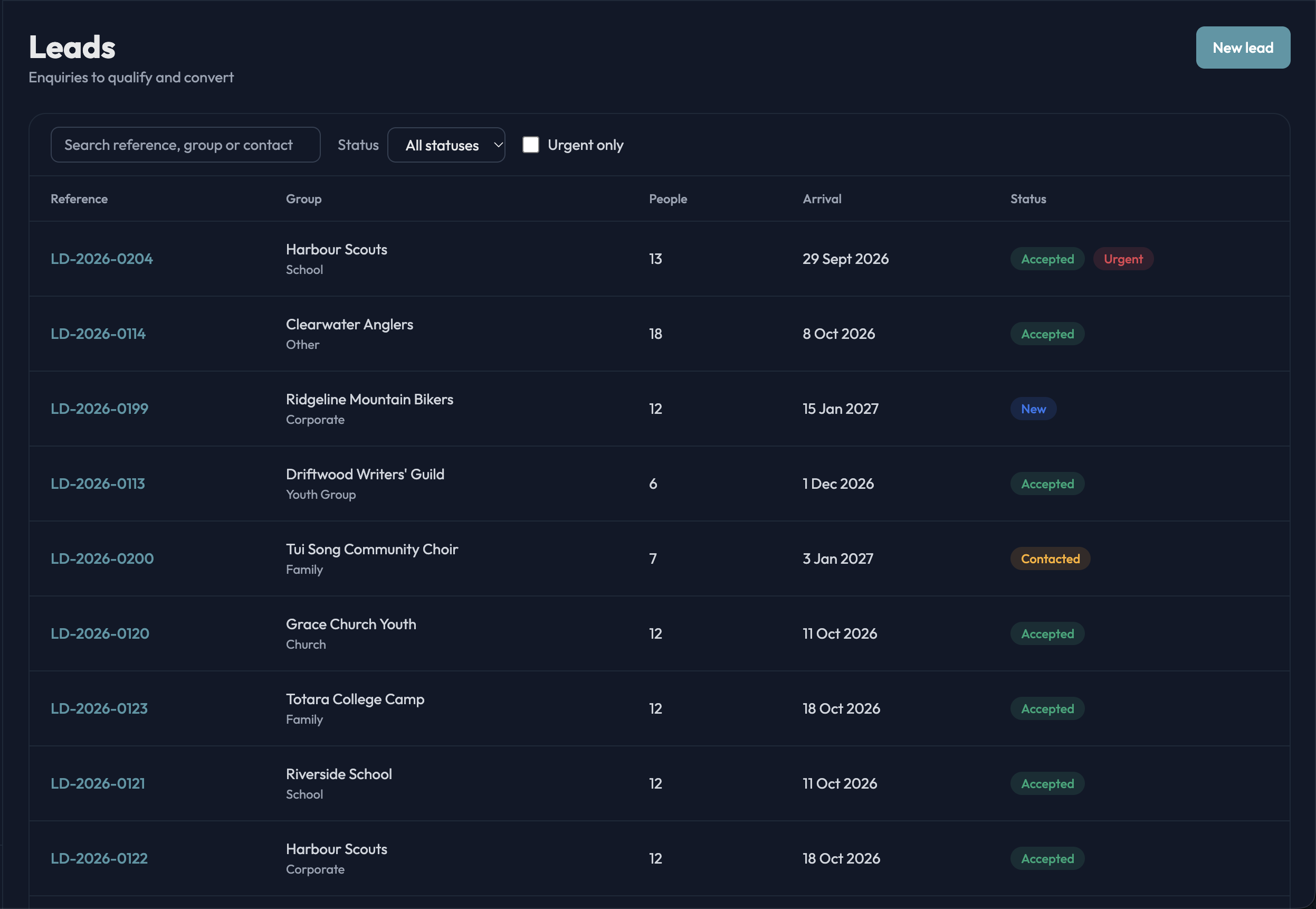
An enquiry form on your own website (or the brochure site we give you) posts straight into Hutvista. Each lead records the group name and type, how many people, the contact, preferred venue, arrival and departure dates with how flexible they are, whether they want catering, where they heard about you, and any dietary notes — with a reference number and a timestamp.
The problem it solves
Enquiries arrive by email, phone and web form and get answered whenever someone gets to the inbox. Details are re-typed into a spreadsheet, dates get lost, and the group books somewhere that replied first.
How it works in practice
- Leads land in one pipeline — new, contacted, qualified, accepted, rejected — sorted so the freshest and most urgent are at the top.
- Hutvista matches the enquiry against groups you have hosted before, so a repeat customer is recognised on arrival.
- Accepting a lead creates the booking in one step: dates, venue, party size and catering carry across, and an overflow venue is offered if the group is bigger than the site.
- The public form is protected by Cloudflare Turnstile, a honeypot and rate limits, so spam never reaches your pipeline.
02
Quotes & seasonal pricing
Set your rates once; Hutvista prices every booking for you.
What it does
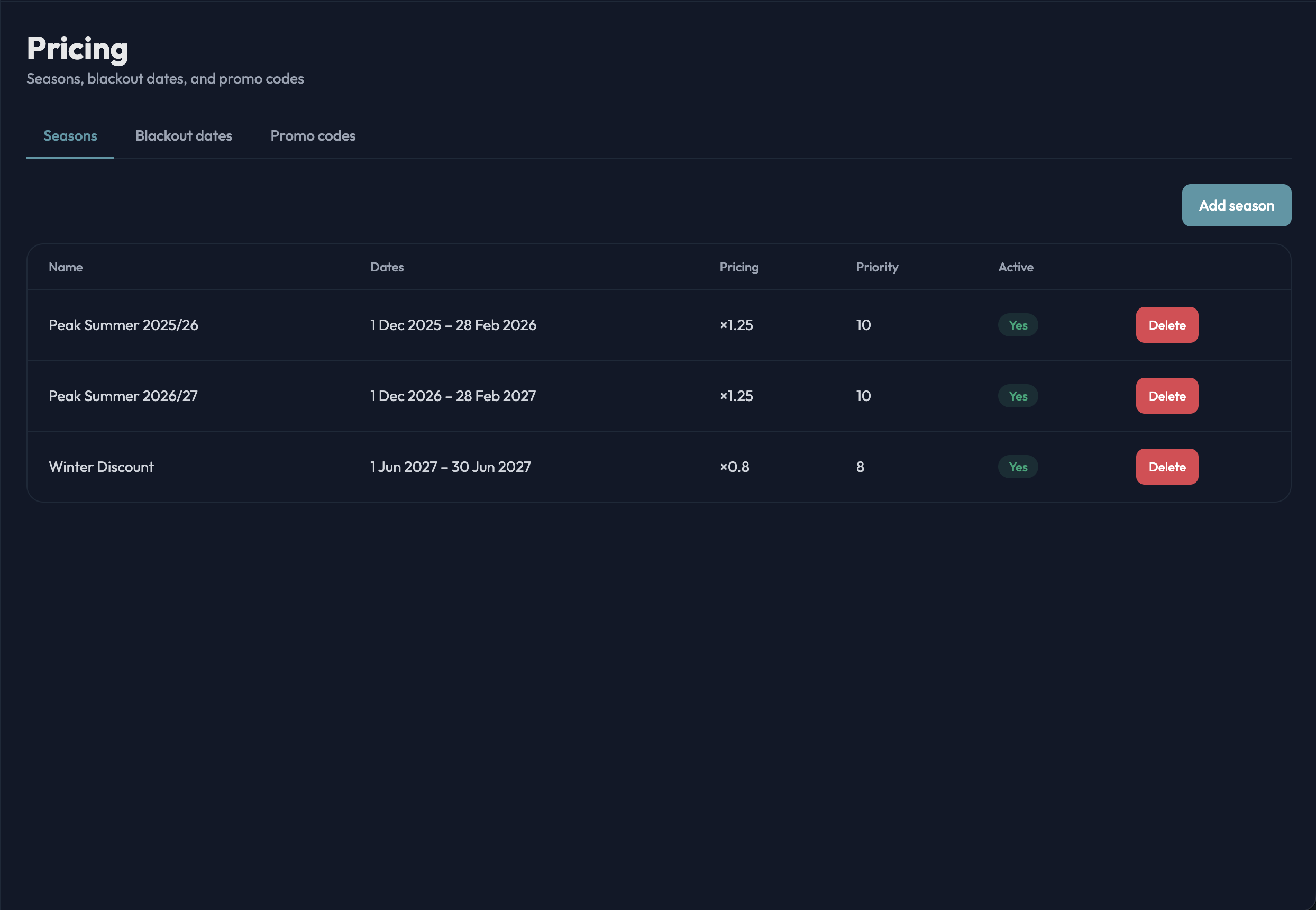
Each venue has a per-person, per-night rate for catered and self-catered stays. Seasons apply a multiplier or an absolute rate over a date range, blackout dates close a venue, and promo codes give a percentage discount within a validity window and usage cap. When a lead is accepted the price is worked out from those rules, with a per-person override when you have negotiated something different.
The problem it solves
Pricing lives in someone’s head or a dog-eared rate card. Peak-season rates get forgotten, discounts are inconsistent, and every quote is a hand-typed email that takes twenty minutes.
How it works in practice
- Configure venues, seasons, blackout dates and promo codes under Settings — once a season, not once a booking.
- The priced booking becomes a booking confirmation document (details, payment terms, your T&Cs and a signature block) and a deposit invoice, both branded with your logo.
- Override the per-person rate on an individual booking when you need to; the override is recorded on the booking.
- Every rate is snapshotted at the time it is used, so a later price change never alters a past booking.
03
Bookings & availability
See what’s booked and what’s free, hold dates, never double-book.
What it does
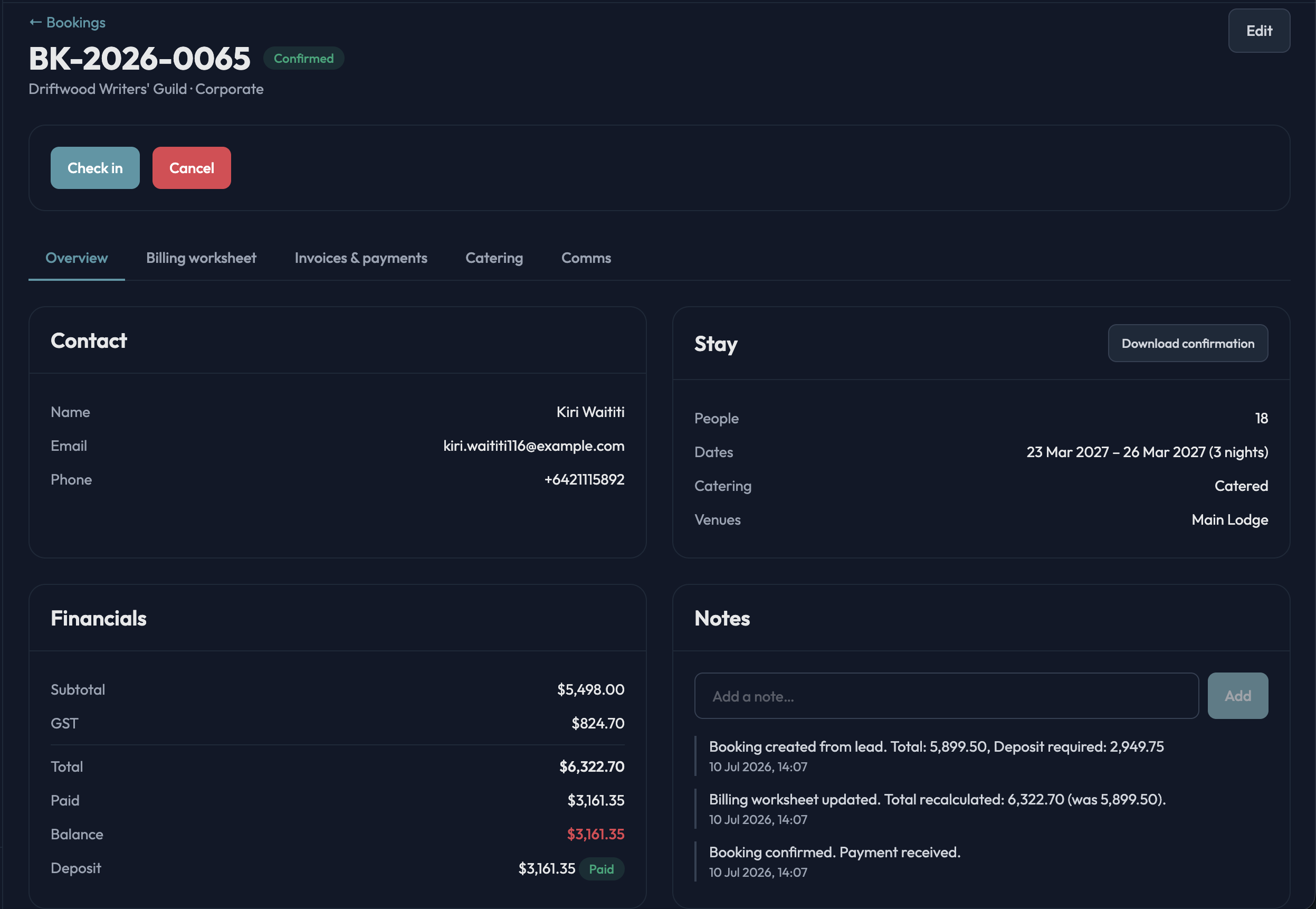
Bookings move from pending through confirmed, in progress and completed (or cancelled and expired). A booking can be held as tentative — the venue is blocked with no money or emails involved — with a confirm-by date and an automatic prompt to the group to confirm or release. The calendar shows confirmed bookings, tentative holds and blackout dates per venue.
The problem it solves
A whiteboard or shared calendar that only one person understands. Two groups pencilled in for the same weekend, a hold that nobody chased, and a “free” date that was actually taken.
How it works in practice
- Several groups can pencil in the same dates; the first deposit confirms, and the others are released with a courteous “that slot has gone” email.
- Tentative holds default to a confirm-by date 60 days before arrival (you can change it). Hutvista emails the group a link to confirm or release, and flags holds that are overdue.
- When a group is bigger than one venue, you can split it across an overflow venue as you accept the lead.
- Each booking is one tabbed page: overview, billing worksheet, invoices and payments, communications — and catering when the stay is catered.
04
Catering & menus
Menus from your recipes, dietary needs per group, a calendar for the kitchen.
What it does
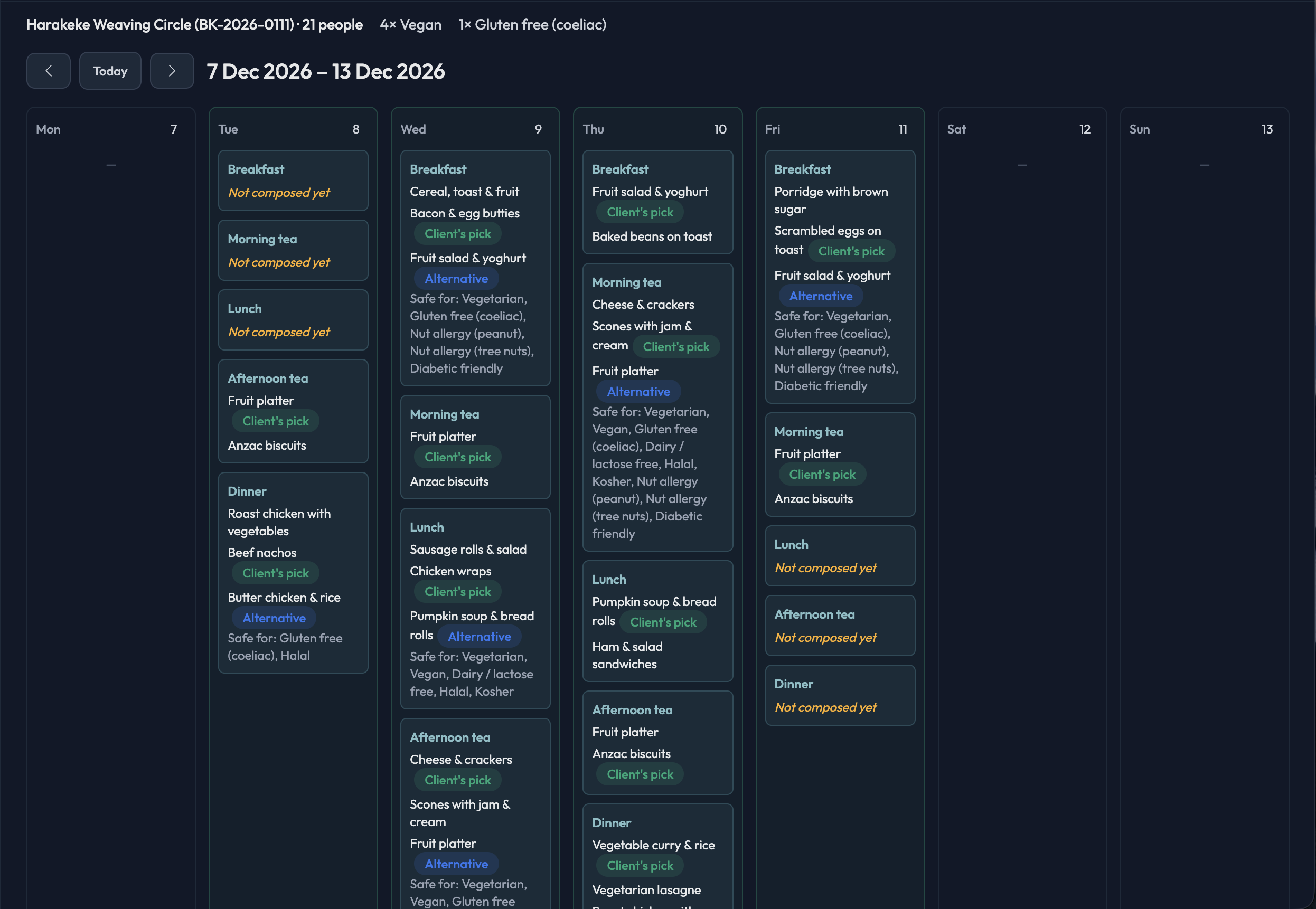
Keep a catalog of your recipes and of dietary restrictions (fifteen common ones are set up for you). For each catered booking, record a dietary profile — how many people per restriction, with anaphylaxis flagged — then compose the menu per mealtime per day, with a main option and flagged alternatives. The group picks their meals through a link that needs no login.
The problem it solves
Dietary needs arrive as a paragraph in an email and get transcribed onto a kitchen whiteboard. The chef finds out about the coeliac on the morning of arrival, and the menu was agreed by phone with nobody writing it down.
How it works in practice
- Send the group a Menu Selection email; they choose one recipe per mealtime per day from the options you composed. Lock it when it’s final, or regenerate the link if it leaks.
- The Catering Calendar’s week view is the chef’s working document: every mealtime, the full option list, headcounts, “safe for” captions, and an explicit “not composed yet” gap so nothing is missed.
- The month view shows the kitchen’s load at a glance; click a day to drill in.
- The billing worksheet has its own daily special-dietary count, so the meals you actually served are the meals you bill.
05
Events & open days
Run your own holiday camps and open days, with online registration.
What it does
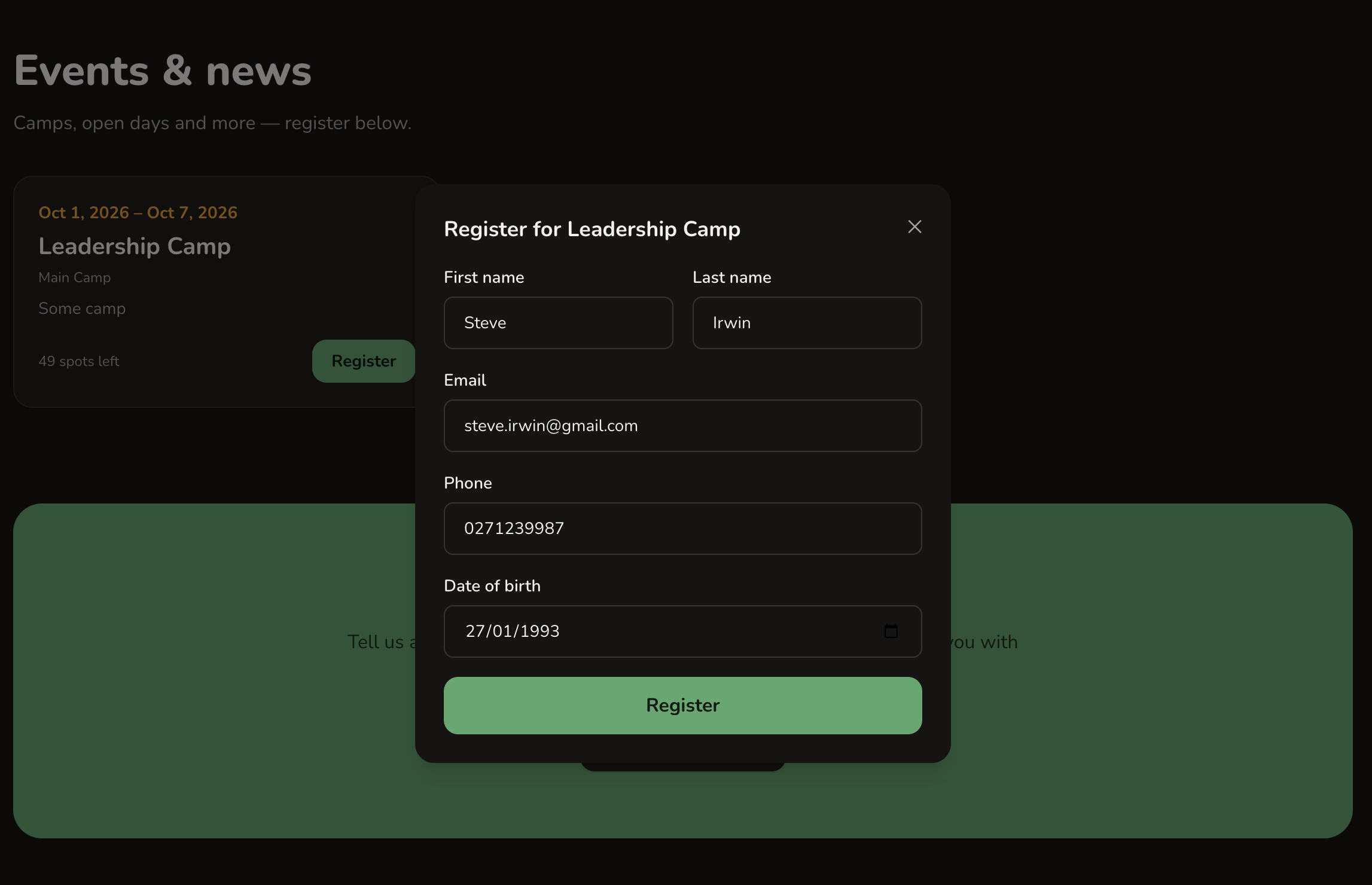
Create an event with dates, venue and capacity, then publish it to your brochure site. Published events block the venue on the bookings calendar. Visitors register online with their name, email, phone and date of birth, and you see every registrant in the event’s page and can email all of them together.
The problem it solves
A Google Form for registrations, a spreadsheet to track them, and a separate email list that is never quite current. Meanwhile the booking calendar doesn’t know the event exists.
How it works in practice
- Draft the event, publish it when ready; it appears on your website with its own registration form.
- Registrants list on the event, with a CSV download for the day’s sign-in sheet.
- Send one email to every registrant from the event’s Communications tab — reminders, what to bring, changes of plan.
- Registrations are free to submit; ticket sales and payment collection are not part of events today.
06
Day visitors & activities
Sell walk-in day visits and paid activities and record the sale on the spot.
What it does
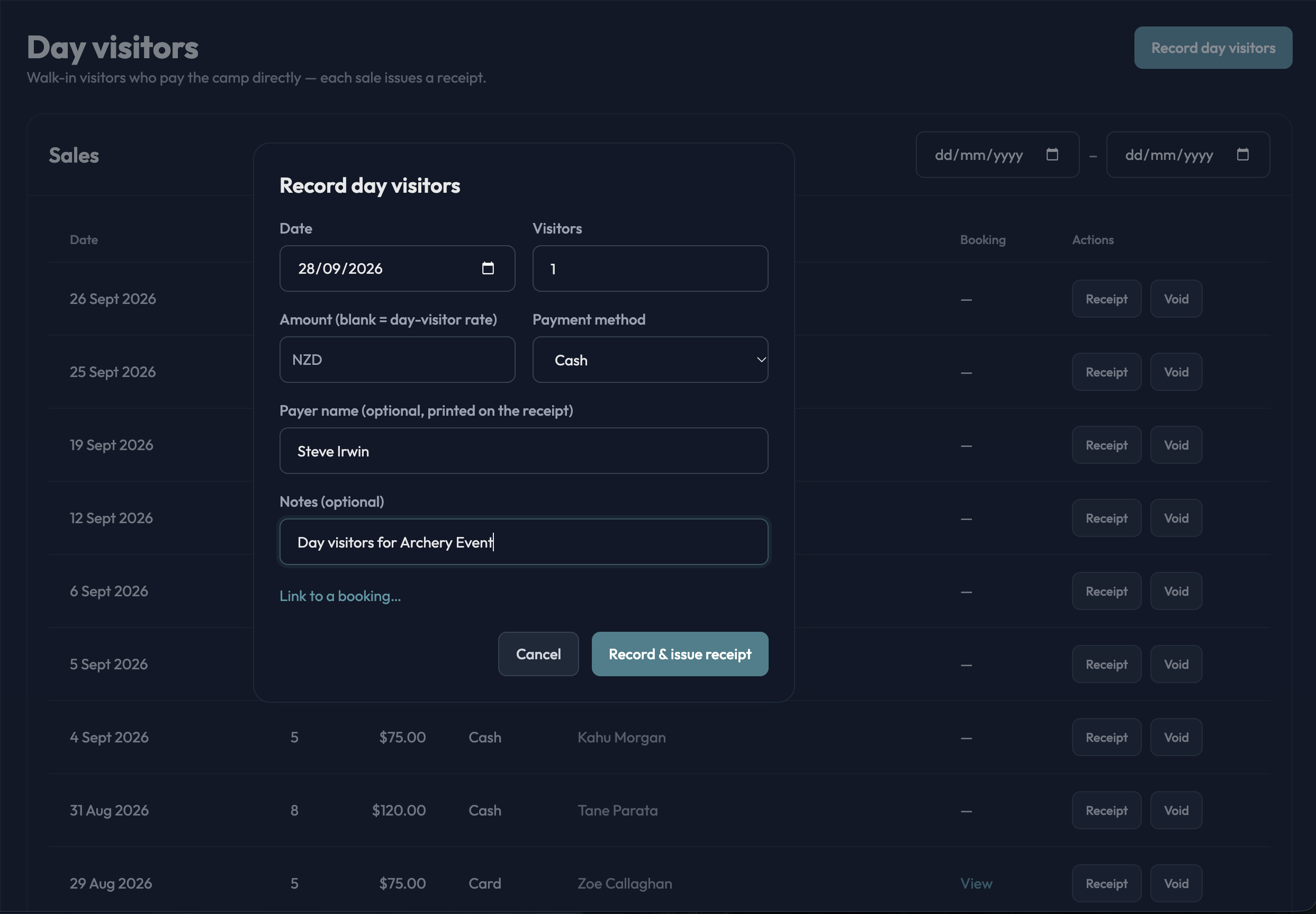
Record a walk-in day-visitor sale — number of people at your day rate, overridable when you agree something different — optionally linked to a booking, and issue the receipt immediately. Keep an activity catalog (abseiling, kayaking, the confidence course) priced per person or at a negotiated flat rate, and add activities to a booking’s billing worksheet.
The problem it solves
Cash sales at the gate in a notebook, activities agreed verbally and forgotten at invoice time, and no record of who came on the day.
How it works in practice
- Front desk records the walk-in, Hutvista issues a numbered receipt there and then; a mistaken sale is voided with a reason, never deleted.
- Activities on a group booking go straight onto that day’s worksheet line and into the final invoice.
- Per-venue minimum billable numbers protect you when a small group books a big site.
07
Operational billing
Bill for who actually came — nights, meals, visitors, activities, extras.
What it does
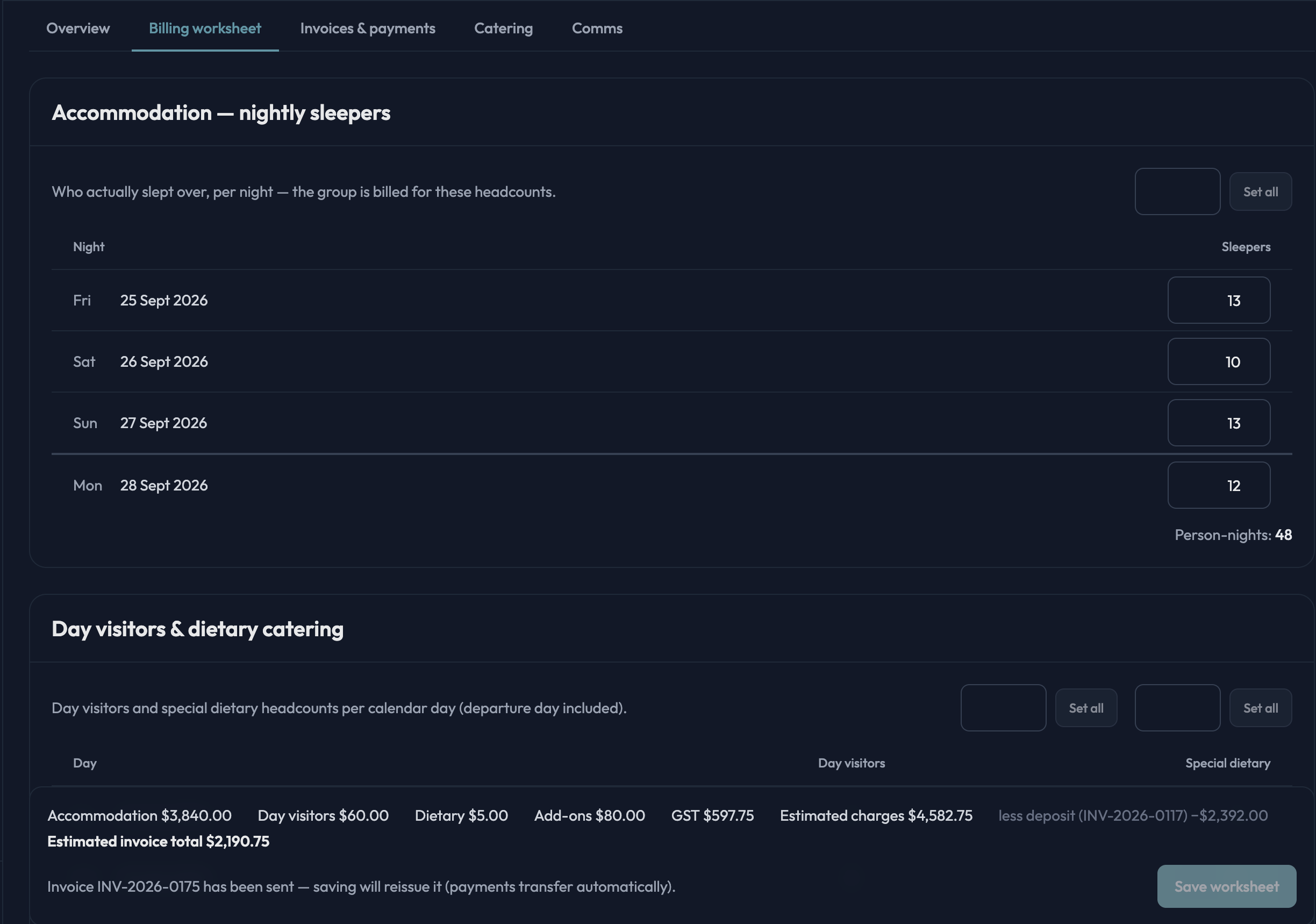
Every booking has a per-day billing worksheet: sleepers per night, day visitors and dietary counts per day, activities, one-off add-ons and a discount (fixed or percentage). Rates are snapshotted when you save, nights are billed for accommodation, calendar days for day visitors and dietary extras, and venue minimums are applied per night.
The problem it solves
The final invoice is reconstructed a week after the group left, from memory and a few sticky notes. Numbers that changed on the day — three extra kids, one fewer night — quietly cost you money.
How it works in practice
- Update the worksheet as the stay happens: arrivals, extra sleepers, the kayaking session that was added on Tuesday.
- Raise the main invoice from the worksheet in one click; the deposit already paid is deducted automatically.
- Drafts refresh in place, so re-raising after a correction never leaves duplicates behind.
08
Invoices, receipts & payments
Deposits, final invoices, part-payments, credit notes and receipts, all branded.
What it does
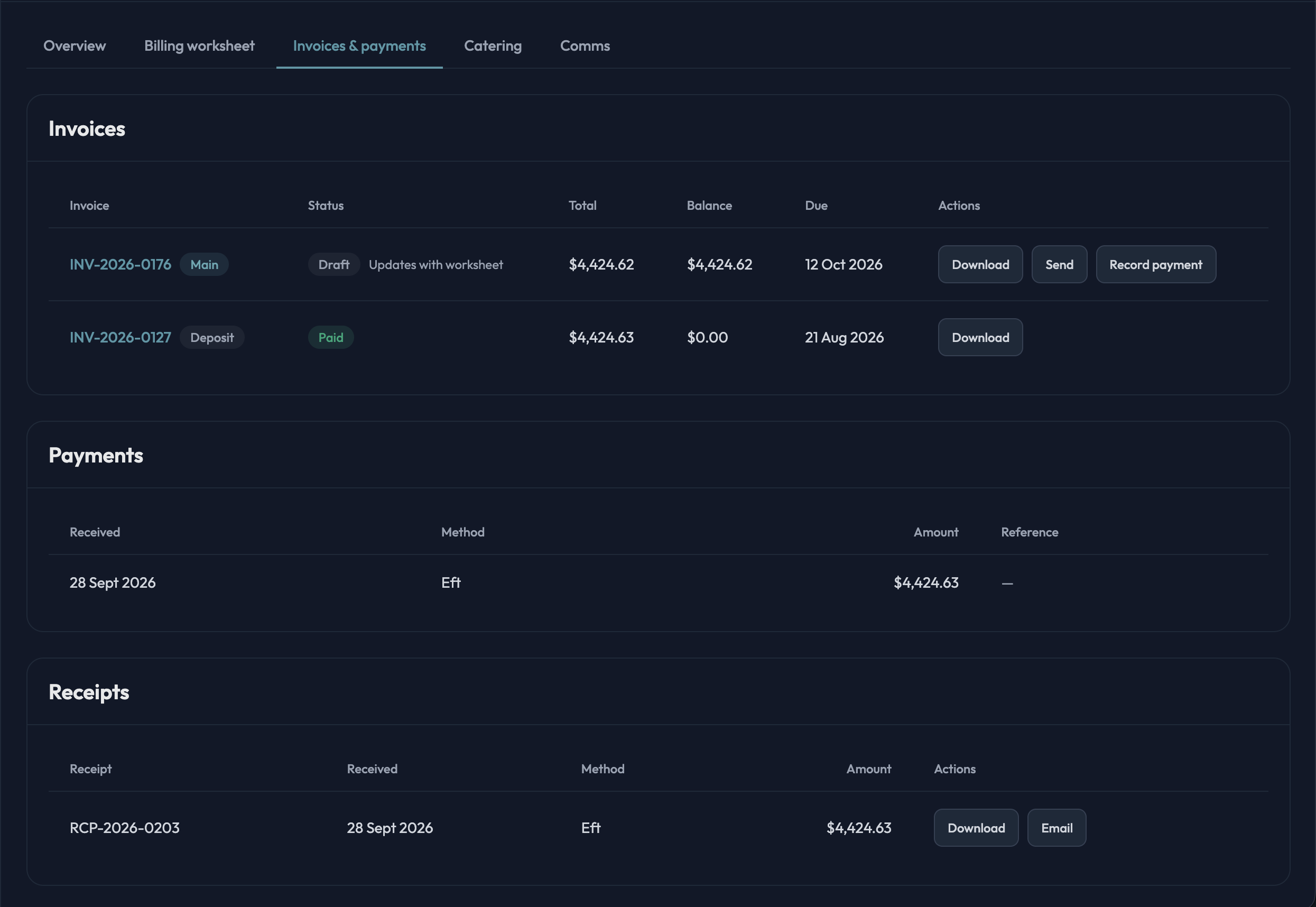
Each booking has a deposit invoice and a main invoice. Paying the deposit confirms the booking. Payments are recorded by your staff (bank transfer, cash, card or other), and every recorded payment issues a numbered receipt. Credit notes handle refunds and cancellations. Invoices, credit notes, receipts and booking confirmations are generated as PDFs with your letterhead and can be emailed from Hutvista.
The problem it solves
Invoices built in Word, receipts written by hand, and a spreadsheet that says who has paid — until someone forgets to update it.
How it works in practice
- Deposit invoice goes out with the confirmation; the group’s payment lands in your bank; you record it and the booking flips to confirmed.
- Part-payments accumulate against the invoice; the outstanding balance is always current.
- Cancellations and refunds produce a credit note against the original invoice, keeping the paper trail intact.
- Hutvista doesn’t take card payments online; you record what arrives in your account, which keeps your bank relationship and fees exactly as they are.
09
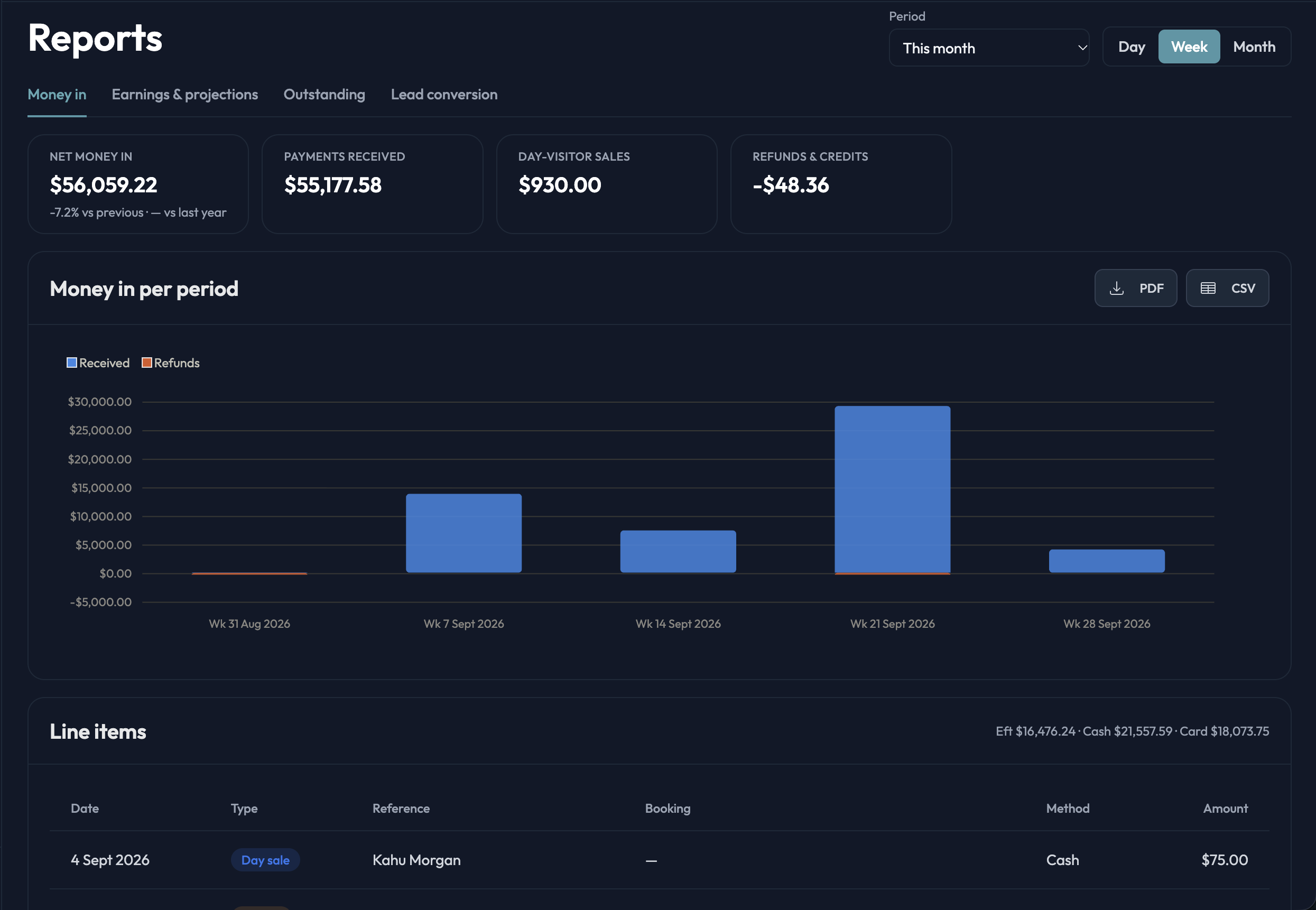
Reports
Cash, earnings, outstanding balances and lead conversion — by month, season or venue.
What it does
Four reports: cash received, earnings and projections, outstanding balances (aged current, 1–30, 31–60 and 60+ days) and lead conversion. Pick a period — including the NZ April-to-March financial year — and a day, week or month granularity. The three financial reports export as branded PDF or CSV; lead conversion exports as CSV.
The problem it solves
End of season means a weekend with the bank statement and a spreadsheet to answer “how did we do?” — and nobody knows who still owes what until the accountant asks.
How it works in practice
- Open Reports, choose the period, and read the charts; export the PDF for the board or the CSV for your accountant.
- Outstanding balances are aged so you know which group to chase first.
- Lead conversion shows how many enquiries became bookings, cohort by cohort, so you can see whether same-day replies are paying off.
10
Guest CRM
Every group’s history in one profile, so repeat bookings are effortless.
What it does
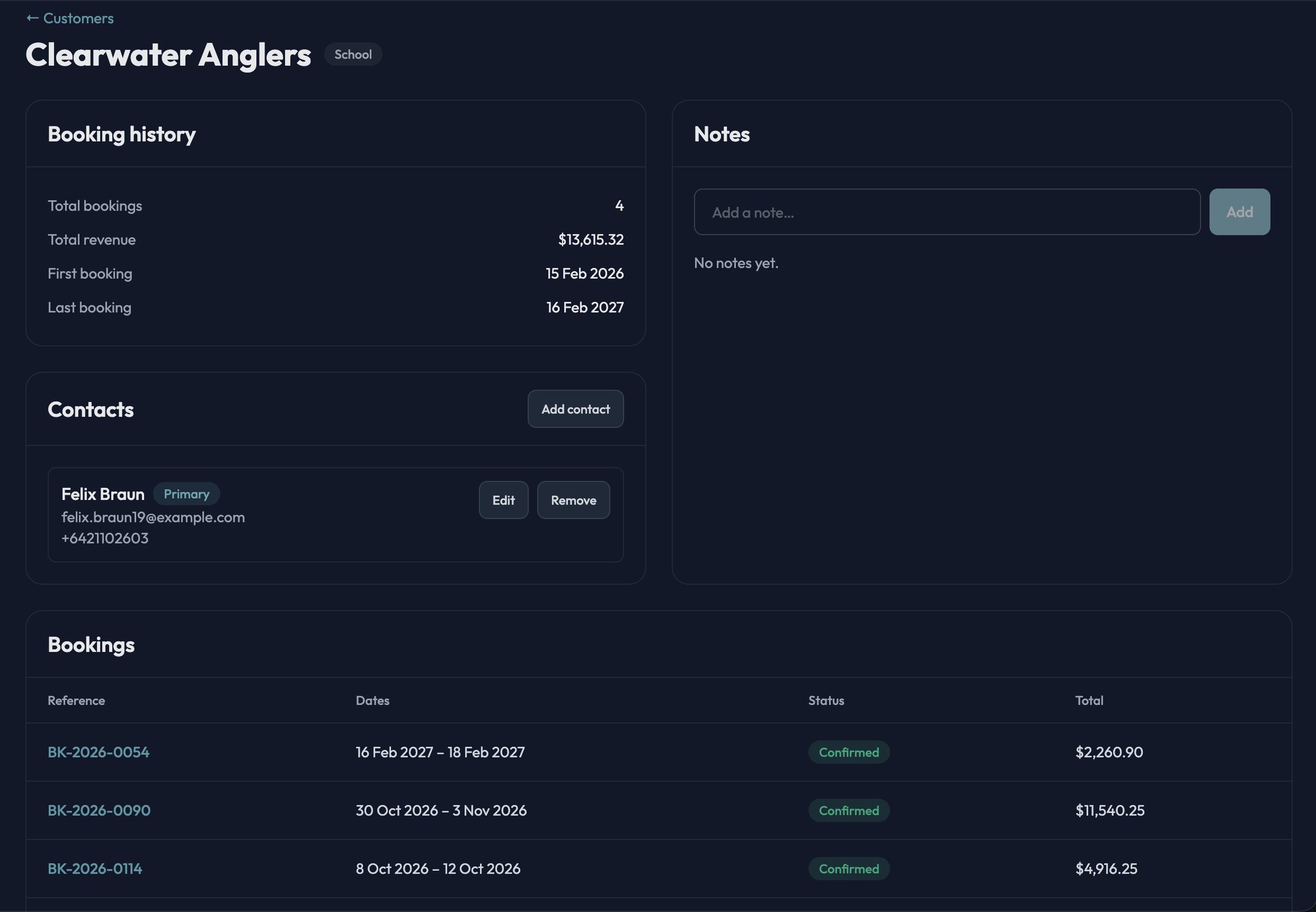
A customer is the group or organisation — a school, a church, a company — with its contacts, notes from your team, the bookings it has made and its lifetime revenue. New enquiries are matched against existing customers, and a confirmed booking is written back onto the customer’s record.
The problem it solves
The school that comes every March is “the one Sue deals with”. When Sue is away nobody knows who the contact is, what they paid last year, or that they always need the gluten-free option.
How it works in practice
- Open a customer to see contacts, notes, past and upcoming bookings, and revenue to date.
- Filter bookings by customer to plan next year’s calendar from this year’s regulars.
- Hutvista tracks groups and headcounts, not individual campers, so there is no personal data on children to look after.
11
Communications
Branded email templates, a document library and the full history of every conversation.
What it does
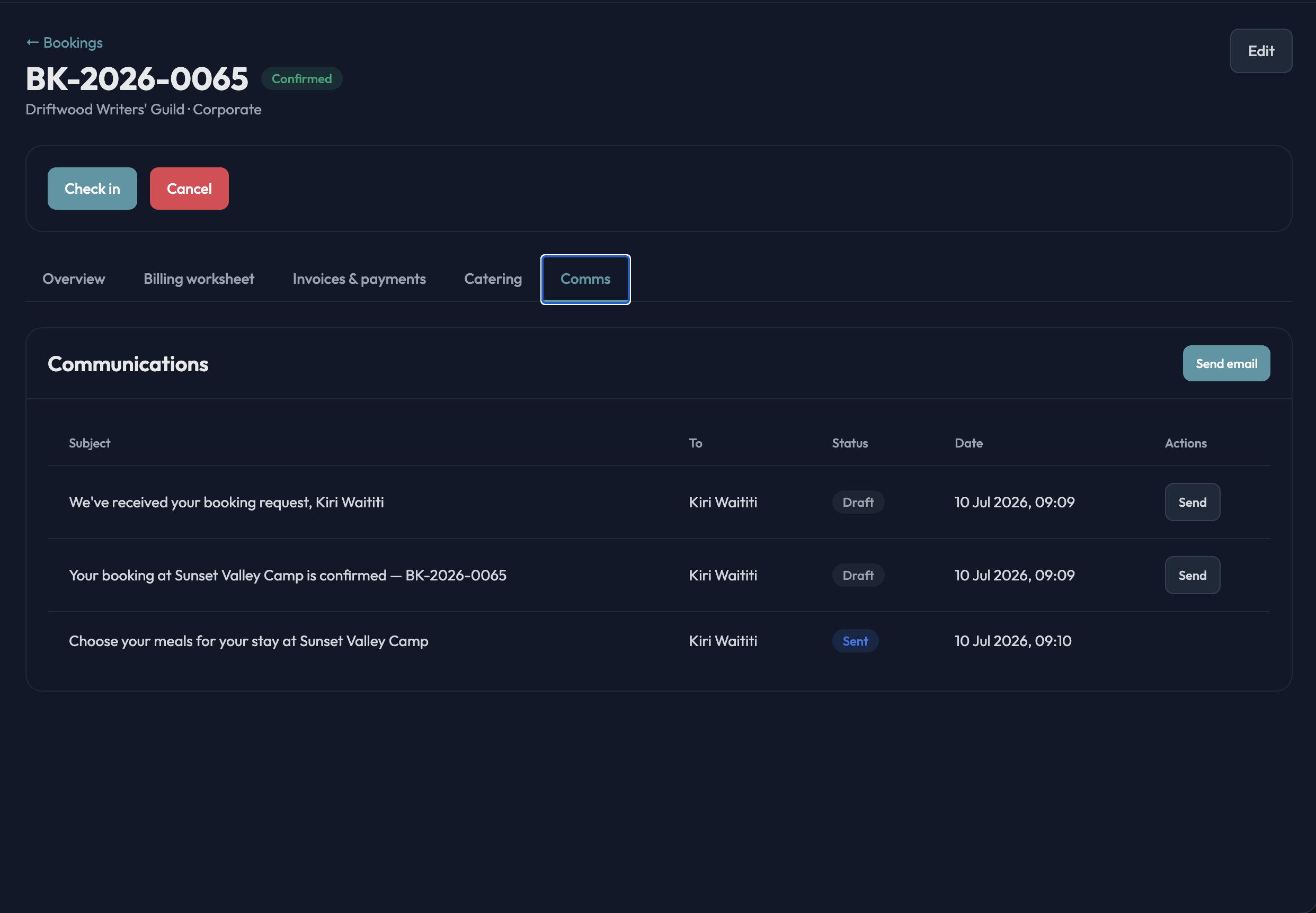
Emails are sent from Hutvista using editable templates for each stage — confirmation, payment reminder, arrival reminder, menu selection, tentative-hold prompt — with your branding and signature, and attachments from a shared document library (T&Cs, arrival information, maps). Every message sent about a booking or event is logged against it.
The problem it solves
Confirmations written from scratch each time, in slightly different words, from three different staff mailboxes. Six months later nobody can find what was promised to the group.
How it works in practice
- Edit the templates once; every confirmation, reminder and menu-selection email is consistent.
- Send from the booking’s Communications tab, or to every registrant on an event at once.
- The message log on each booking shows what was sent, when, and whether it went out or failed.
- These are transactional emails to your groups — Hutvista is not a mass-marketing or newsletter tool.
12
Secure by default
Two-factor authentication, roles for your team, and your data kept to your camp.
What it does
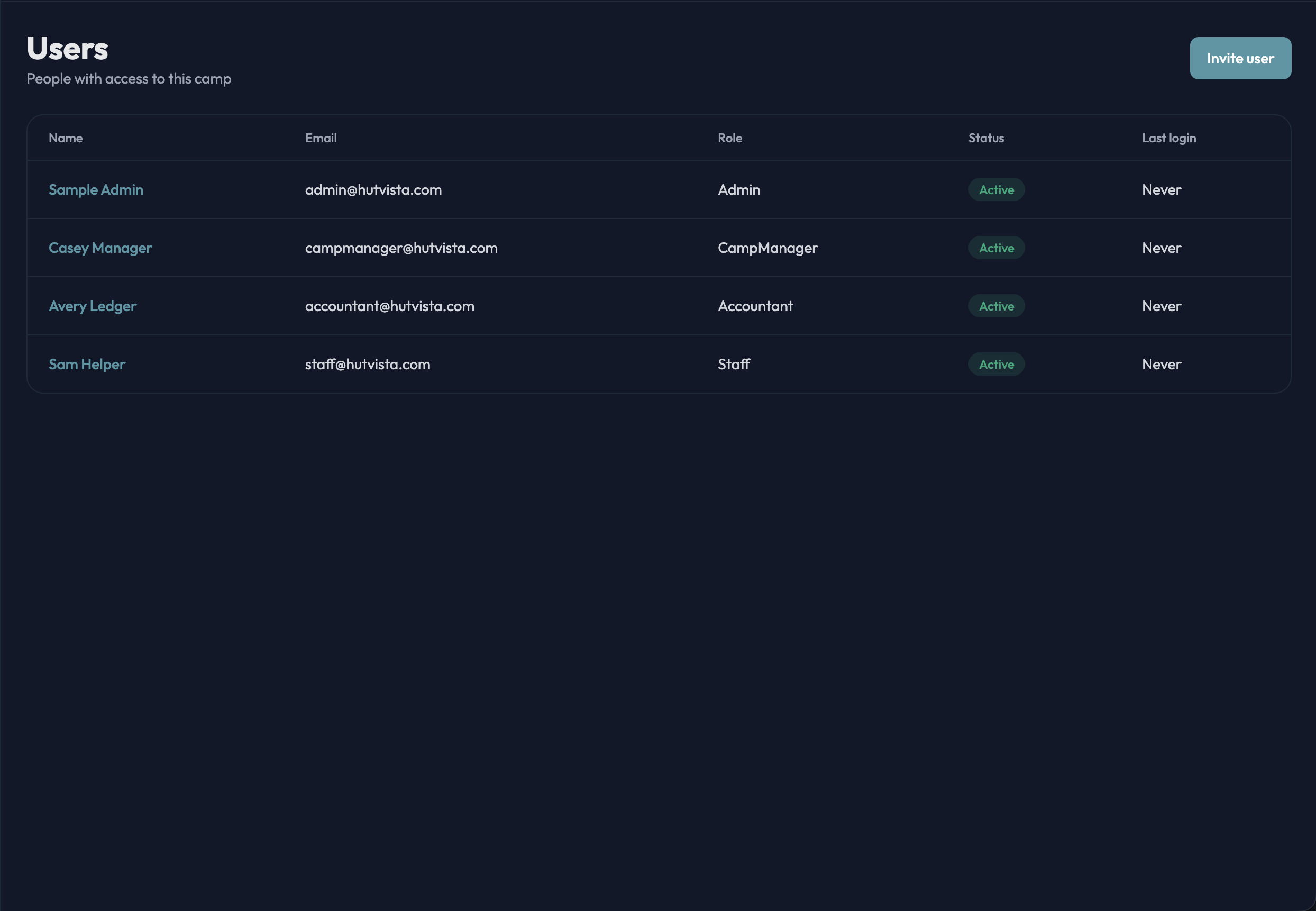
Every user can turn on two-factor authentication with an authenticator app (with recovery codes), and sensitive actions ask for a fresh confirmation. Roles — admin, camp manager, accountant, staff — control who can do what, and you invite your team by email. Your camp’s data is isolated from every other camp on the platform, and public forms are rate-limited and bot-protected.
The problem it solves
One shared login on a sticky note, an ex-employee who can still see the bookings, and the accountant with more access than they need.
How it works in practice
- Invite each team member individually and give them the right role; deactivate them when they leave and they are locked out immediately.
- Accounts lock after repeated failed sign-ins.
- Give your accountant their own login with the accountant role instead of sharing yours.
Also included
The details that make the difference between software you tolerate and software your team actually uses.
- Multi-venue: every site in one account, one login
- Held-tentative bookings for groups still confirming
- Branded PDF invoices, receipts and confirmations with your logo
- Client-facing menu selection link — no login needed for the group
- We import your existing bookings and customers when you come on board
- Runs in your local timezone and locale
- Your own brochure website, wired straight into Hutvista
Want to see it with your camp’s numbers?
See Hutvista in action. Book a personal demo and we’ll tailor it to how your camp runs.
One price, everything included: $300 per camp, per month.
No lock-in contracts. Cancel anytime, and take your data with you.